

Cómo decodificar tokens JWT online
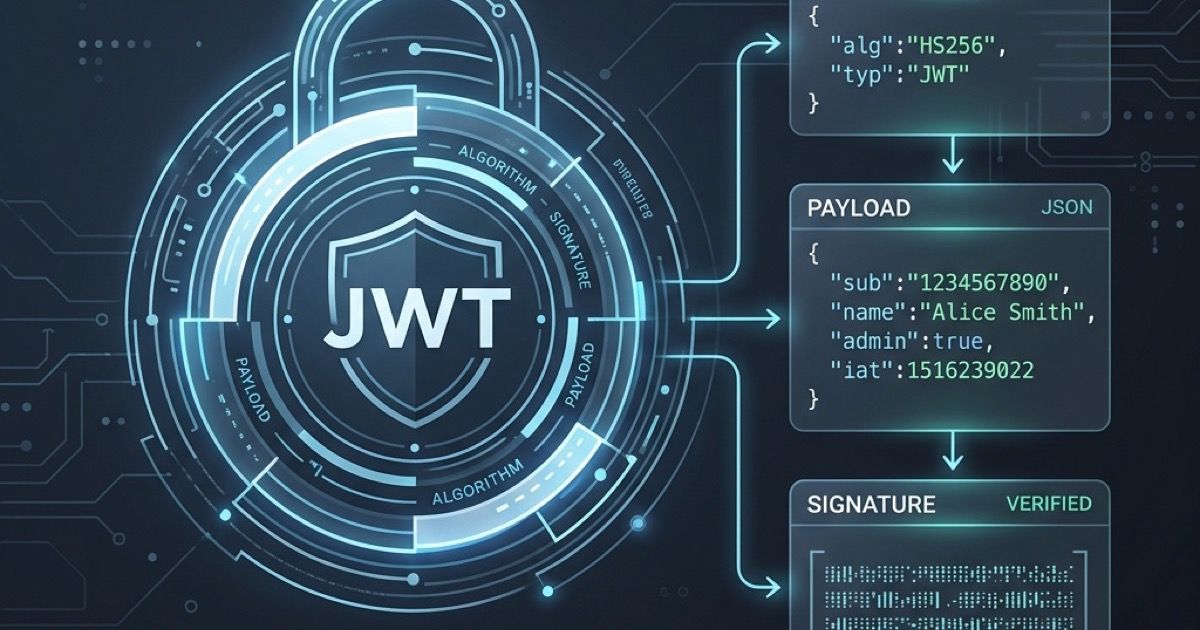
JSON Web Tokens (JWT) are a widely used standard for securely transmitting information between parties as a JSON object. If you're a web developer building authentication systems, you will inevitably need to inspect the contents of a JWT.
In this article, we will explain what a JWT is and how you can easily decode and verify it using our free online JWT Decoder tool.
Structure of a JWT
A JWT consists of three parts separated by dots (.):
- Header: Contains metadata about the type of token and the cryptographic algorithms used to secure its contents.
- Payload: Contains the claims. This is where the actual data (like user ID, expiration time, or roles) is stored.
- Signature: Used to verify that the sender of the JWT is who it says it is and to ensure that the message wasn't changed along the way.
It looks something like this:
xxxxxxx.yyyyyyy.zzzzzzz
Why Decode a JWT?
- Debugging Authentication: Verify that the correct user data or permissions (claims) are included in the payload.
- Checking Expiration: Ensure the token hasn't expired by inspecting the
expclaim. - Verifying Integrity: If you have the secret key, you can verify if the signature is valid.
Using the Online JWT Decoder
Our JWT Decoder runs entirely in your browser, meaning your tokens are never sent to our servers. Your security and privacy are guaranteed.
- Navigate to the JWT Decoder tool.
- Paste your token into the "Encoded Token" text area.
- The tool will automatically parse and display the decoded JSON for both the Header and Payload in a structured, syntax-highlighted format.
- You can clearly view standard claims like
iat(Issued At) andexp(Expiration Time) converted into readable dates.
Stop writing custom scripts just to view token contents—bookmark the JWT Decoder and speed up your API development today!
Publicaciones relacionadas
Convertir imágenes a Base64: cuándo ayuda y cuándo perjudica
Aprende cuándo las cadenas de imagen Base64 son útiles para prototipos, correos y activos pequeños, y cuándo es mejor usar archivos normales.
Cómo convertir archivos JSON de sesión de ChatGPT de forma segura en el navegador
Convierte JSON de sesión de ChatGPT a formatos Sub2API, CPA, Cockpit, 9Router, Codex y AxonHub localmente en el navegador sin exponer tus tokens.